




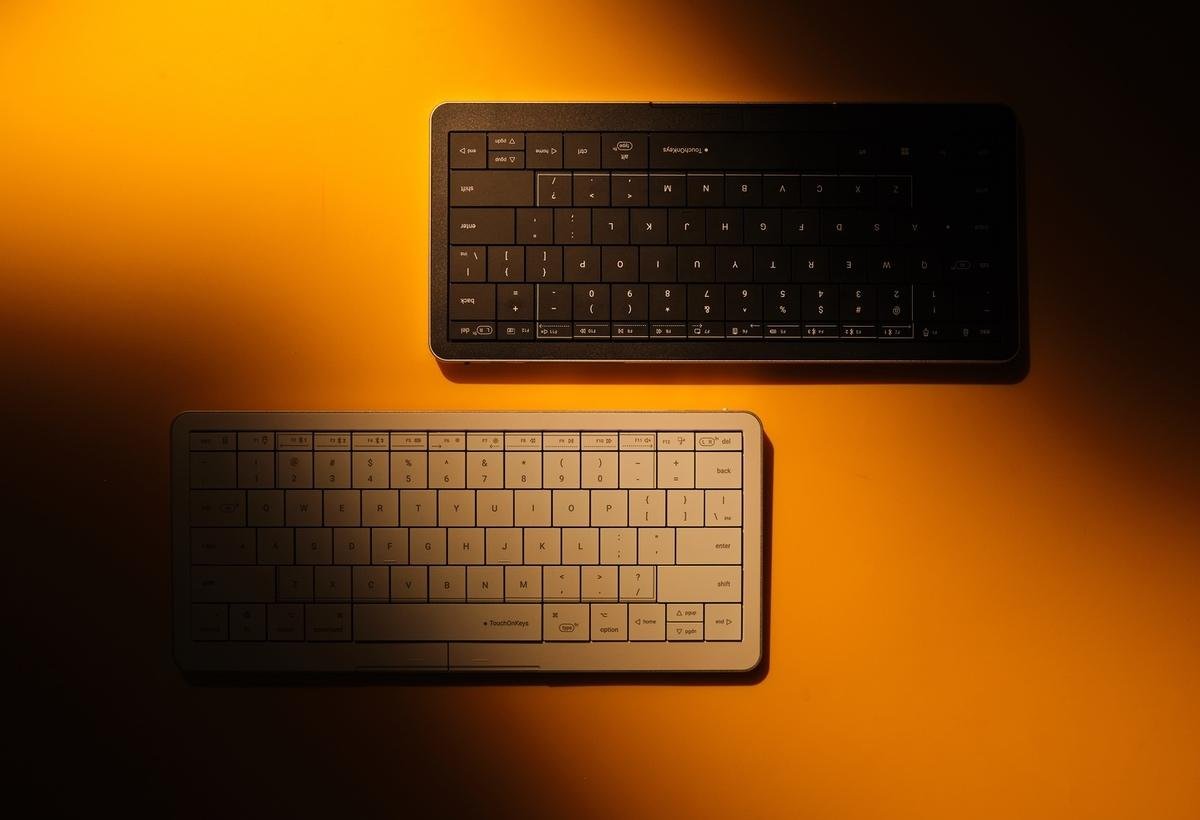
This new and compact Clevetura CLVX S keyboard has a trackpad zone on its surface.
CLEVETURA
In the desktop era we relied on a keyboard and mouse to navigate the screen. Those were the days when laptops were largely out of reach, but these days most people are used to using a laptop as their primary computer.
The problem with laptops is their cramped keyboards and tiny trackpads that can be difficult to type on and a bit of an ergonomic nightmare. For example, you have to take your fingers off the keyboard to use the trackpad just to move the cursor around the screen or perform gestures like pinching and swiping. It slows down the workflow
Clevetura is a company that spotted a gap in the market and made a keyboard that has a trackpad built into it. It’s a better solution than typing on a laptop and using a touchpad because you don’t have to take your fingers off the keyboard to use the trackpad.
Clevetura CLVX S for Mac can recognize native macOS trackpad gestures.
CLEVETURA
Built-in Trackpad
Clevetura’s keyboard technology works, but it uses a trackpad sensor built under a keyboard, allowing users to seamlessly switch from typing to tracking and gestures without having to lift their hands from the keys. It seems so obvious when you think about the idea.
Based in Limassol, Cyprus, Clevetura has developed TouchOnKeys technology that combines a trackpad with a keyboard. The company is headed by Mike Krupenkov and currently has offices in the US and China. It has been perfecting the unique TouchOnKeys technology since 2017 and is constantly evolving and strengthening the concept.
Originally developed for Windows and Linux PCs, Clevetura made a full-sized keyboard for Mac users in the form of the CLVX 1 last year. Now the company has released the Clevetura CLVX S, a compact 78-key model for people on the go who want to break free from cramped laptop keyboards and trackpads.
Clevetura’s keyboard technology works, but it uses a trackpad sensor built under a keyboard, allowing users to seamlessly switch from typing to tracking and gestures without having to lift their hands from the keys.
CLEVETURA
Native gestures
In addition to trackpad functionality, Clevetura’s software can recognize the native trackpad gestures used in macOS. This allows for seamless switching between typing and gesturing or moving the pointer around the screen. Thanks to its integrated trackpad, the CLVX S keyboard makes coding, designing and editing on a Mac faster and more efficient than when using a laptop’s trackpad and keyboard.
The CLVX S has a compact ANSI layout for macOS with 78 keys that have laptop-style scissor switches underneath. It has a full array of function/media keys which are all RGB LED backlit. In addition to connecting via USB-C, the CLVX S can pair with up to three separate Bluetooth devices and can seamlessly switch between them, allowing users to control multiple laptops and a tablet from a single keyboard.
The trackpad zone on the CLVX S is slightly smaller than the keyboard itself and is delimited by a thin line. The surface is larger than most laptop trackpads and can be easily turned on or off. For example, you may prefer to use a mouse or stylus for some tasks and a trackpad for others. The beauty of the built-in trackpad is that it also recognizes native macOS gestures that a MacBook can use, such as pinch, zoom, and swipe.
It is possible to disable Clevetura’s built-in CLVX S trackpad and use it as a simple keyboard.
CLEVETURA
Flat key surface
The construction of the CLVX S is of high quality and all keys are completely flat without the slight scoop or saucer shape found on most keys. It may take some getting used to, but it’s worth it for the convenience of having a trackpad at your fingertips. At first, there may be a tendency for the fingers to slip and slide a bit while typing, but after a few minutes of adjustment, it all becomes second nature.
The keys on the CLVX S are backlit with RGB LEDs and each key has glow legends, making the keyboard suitable for use in low-light settings such as an editing suite. The top row can be used as classic function keys or in multimedia mode providing access to controls for playing music, adjusting the backlight and switching connectivity options. The row of keys also features two touch slider areas that can be used to adjust the backlight and volume levels.
Clevetura TouchOnKeys software is the real intelligence behind the CLVX S and can be used to set up custom profiles, finger gestures, touch sliders and even train adaptive AI to adapt and learn from the user’s typing style. The keyboard also has large left and right mouse buttons placed just below the spacebar that can be used to click buttons or access context menus in macOS.
Prices and Availability:
The Clevetura CLVX S trackpad keyboard is available from September 30, 2025, at clevetura.com and costs $179 plus shipping. Supporters can also order via Kickstarter.
Technical specifications:
- Compatibility: macOS / Windows / Linux.
- Battery type: Li-Ion.
- Battery capacity: 1,900 mAh.
- Battery life: A single charge provides up to 44 hours of continuous work or 10 days of normal use without backlighting.
- Materials: Anodized aluminum base, polycarbonate top, ABS keycaps.
- Dimensions (H x W x D): 124 x 292 x 130 mm.
- Weight: 430g.
- Touchpad area: 186 x 84 mm.
- Number of keys: 78.
- Mechanism: Scissors.
- Layout: US ANSI.
- Typing force: 60 g.
- Key pitch: 19 mm.
- Key lifetime: 3 million.
- Connectivity: USB Type C / Bluetooth x 3.
